An H5 Mini App runs your web content inside a WebView within the Rebell SuperApp. There is no Mini Program framework, no IDE, and no build process required — just a hosted web page and a single <script> tag.
H5 is the fastest path to deploying an existing mobile web app as a Mini App. It is ideal as a migration strategy or for content-driven experiences.

How It Works

  • The SuperApp loads your web page at the configured Entrance URL
  • Your page runs inside a managed WebView
  • You access SuperApp capabilities through the JSBridge SDK — the same my.* namespace used by Native Mini Apps
  • No quality review or build pipeline is required

Step 1: Configure Your Entrance URL

In the Rebell developer portal, create an H5 Mini App and set the Entrance URL to your hosted web page: Create H5 Mini App in the developer portal
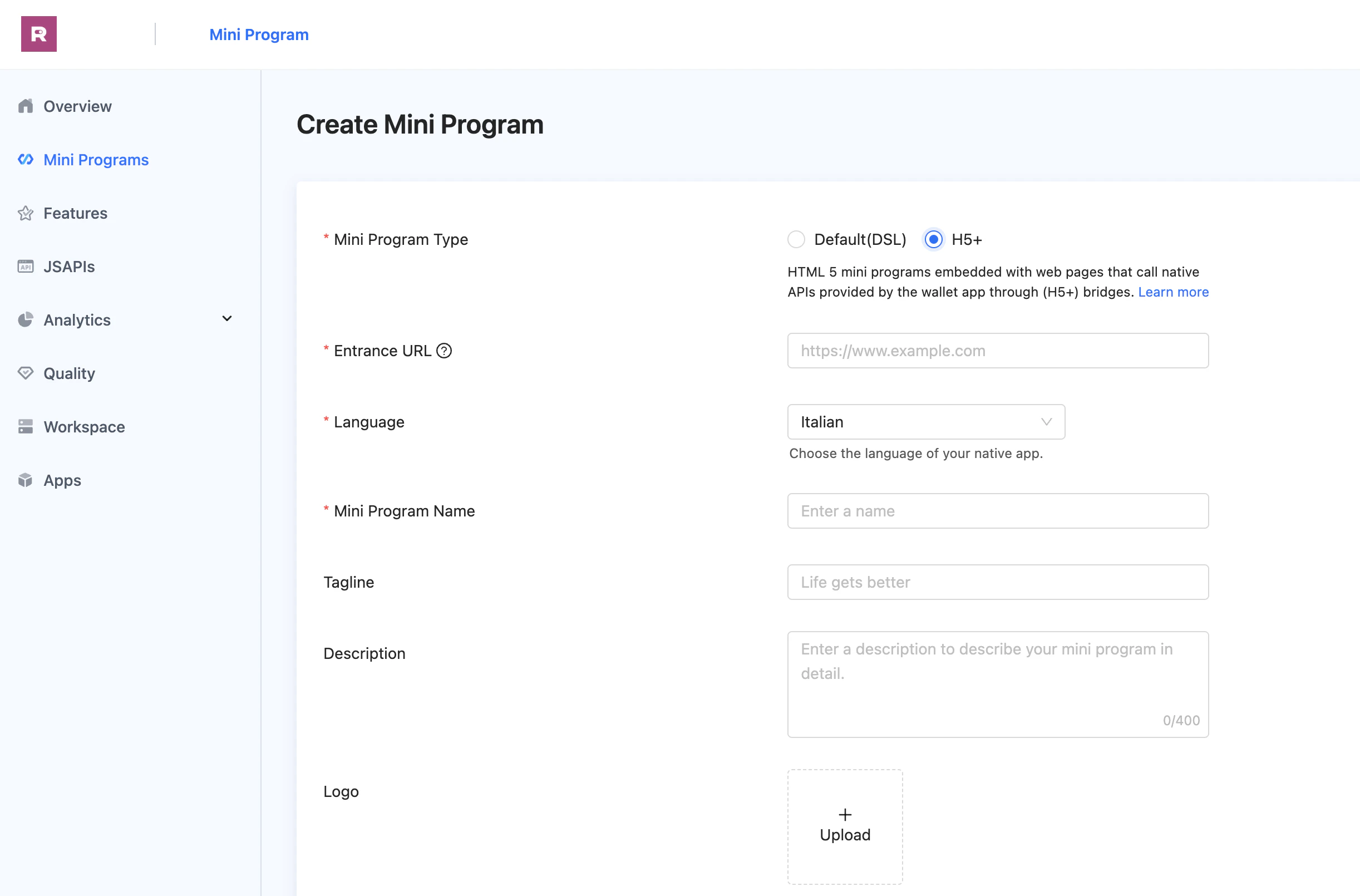
https://your-domain.com/mini-app/index.html
Requirements:
  • Must be HTTPS
  • Must be accessible from mobile devices
  • Domain must be whitelisted in your Mini App configuration

Step 2: Add the JSBridge SDK

Include the JSBridge script in the <head> of your HTML page:
<!DOCTYPE html>
<html>
<head>
  <meta charset="UTF-8" />
  <meta name="viewport" content="width=device-width, initial-scale=1.0" />
  <title>My Service</title>

  <!-- JSBridge SDK — must load before any my.* calls -->
  <script src="https://cdn.marmot-cloud.com/npm/hylid-bridge/2.10.0/index.js"></script>
</head>
<body>
  <!-- your content -->
</body>
</html>
Once loaded, the my object is available globally.

Step 3: Detect the Environment

JSAPI calls only work inside the SuperApp WebView. Detect the environment before using my.*:
function isInsideSuperApp() {
  return /MiniProgram/.test(navigator.userAgent);
}

if (isInsideSuperApp()) {
  // Safe to call my.* APIs
  my.getSystemInfo({
    success: (res) => console.log('Platform:', res.platform),
  });
} else {
  // Running in a regular browser — use fallback behavior
  console.log('Running in browser, JSAPI unavailable');
}
my.JSBridge is a reserved object and cannot be overridden. console.log also cannot be replaced inside the Mini App runtime.

Step 4: Use JSAPI

All JSAPI calls follow the same callback pattern:
my.apiName({
  // parameters
  success(res) { /* called on success */ },
  fail(err)    { /* called on failure */ },
  complete(res){ /* always called */    },
});
H5 Mini Apps support only a subset of the JSAPI available to Native Mini Apps. APIs that depend on the Mini Program runtime (e.g., page routing, custom components, worker threads) are not available inside a WebView.

Supported APIs

APIDescription
my.getRunSceneGet the launch scene of the Mini App
API
my.showNavigationBarLoading
my.hideNavigationBarLoading
my.setNavigationBar
API
my.alert
my.confirm
my.prompt
my.showLoading
my.hideLoading
my.showToast
my.hideToast
my.showActionSheet
APIDescription
my.choosePhoneContactSelect a contact from the phone book
my.datePickerOpen a native date picker
my.hideKeyboardDismiss the soft keyboard
my.multiLevelSelectMulti-level cascading selector
my.setBackgroundColorSet the window background color
my.setCanPullDownEnable or disable pull-to-refresh
API
my.chooseImage
my.previewImage
my.saveImage
my.getImageInfo
my.compressImage
API
my.chooseVideo
API
my.getStorage
my.setStorage
my.removeStorage
my.clearStorage
API
my.saveFile
my.getFileInfo
my.getSavedFileInfo
my.getSavedFileList
my.removeSavedFile
my.chooseFileFromDisk
my.openDocument
API
my.getLocation
my.openLocation
my.chooseLocation
my.calculateRoute
API
my.request
my.uploadFile
my.downloadFile
API
my.getSystemInfo
my.getNetworkType
my.getClipboard
my.setClipboard
my.watchShake
my.onAccelerometerChange
my.offAccelerometerChange
my.onCompassChange
my.offCompassChange
my.vibrateShort
my.vibrateLong
my.makePhoneCall
my.setScreenBrightness
my.getScreenBrightness
my.setKeepScreenOn
my.getScreenOrientation
my.setScreenOrientation
my.scan
my.getBatteryInfo
my.addPhoneContact
my.getSetting
my.openSetting
my.showAuthGuide
API
my.checkLocalBioAuthSupported
my.startLocalBioAuth
API
my.showSharePanel
my.navigateToMiniProgram
my.navigateBackMiniProgram
API
my.getAuthCode
my.tradePay

Usage Examples

my.getAuthCode({
  success: (res) => {
    // Send res.authCode to your backend to identify the user
    fetch('/api/login', {
      method: 'POST',
      body: JSON.stringify({ authCode: res.authCode }),
    });
  },
});
// Native alert dialog
my.alert({
  title: 'Order Placed',
  content: 'Your order has been confirmed.',
  buttonText: 'OK',
});

// Native toast
my.showToast({
  content: 'Saved!',
  type: 'success',
  duration: 2000,
});
// tradeNO must come from your backend
my.tradePay({
  tradeNO: '<payment reference from your backend>',
  success: (res) => {
    if (res.resultCode === '9000') {
      window.location.href = '/success';
    }
  },
  fail: (err) => {
    my.alert({ title: 'Payment failed', content: err.errorMessage });
  },
});
my.setNavigationBar({
  title: 'Checkout',
});

Step 5: Handle Payments

Payment flow in an H5 Mini App:
1

User taps Pay

User initiates payment from your web page
2

Call your backend

Your page sends order details to your backend via fetch or XMLHttpRequest
3

Backend creates payment

Your backend calls the Rebell Payment API and returns a tradeNO
4

Call my.tradePay

Pass the tradeNO to my.tradePay — Rebell handles the rest
5

Handle result

On success, redirect or update the page. Your backend also receives a webhook.
async function initiatePayment(orderData) {
  // 1. Create payment on your backend
  const response = await fetch('/api/payment/create', {
    method: 'POST',
    headers: { 'Content-Type': 'application/json' },
    body: JSON.stringify(orderData),
  });
  const { tradeNO } = await response.json();

  // 2. Open Rebell payment UI
  my.tradePay({
    tradeNO,
    success: (res) => {
      if (res.resultCode === '9000') {
        window.location.href = '/order/success';
      } else {
        showError('Payment was not completed');
      }
    },
    fail: (err) => showError(err.errorMessage),
  });
}

Limitations vs. Native

H5 Mini Apps have a narrower set of available APIs compared to Native:
CapabilityNativeH5
Full JSAPI accessPartial
Payment (my.tradePay)
Auth code
Native navigationLimited
Platform UI components
WebView accessVia componentRuns inside one
If you need deeper SuperApp integration or native UI components, consider migrating to a Native Mini App.

Testing

H5 Mini Apps can be tested directly:
  1. Configure your Entrance URL to point to a sandbox or staging version of your page
  2. Open the Mini App from within the Rebell SuperApp (sandbox)
  3. Inspect behavior in browser DevTools when running locally — JSAPI calls will silently fail outside the SuperApp
  4. Use isInsideSuperApp() to provide a fallback experience during development

Next Steps

JSAPI Reference

Full list of my.* APIs and their parameters

Payments

Complete guide to triggering payments from Mini Apps

Backend Authentication

Exchange auth codes for user identity on your backend